How to fix your hardened motorcycle tablet for off-road? Support Guide (AMPS, RAM Mount)
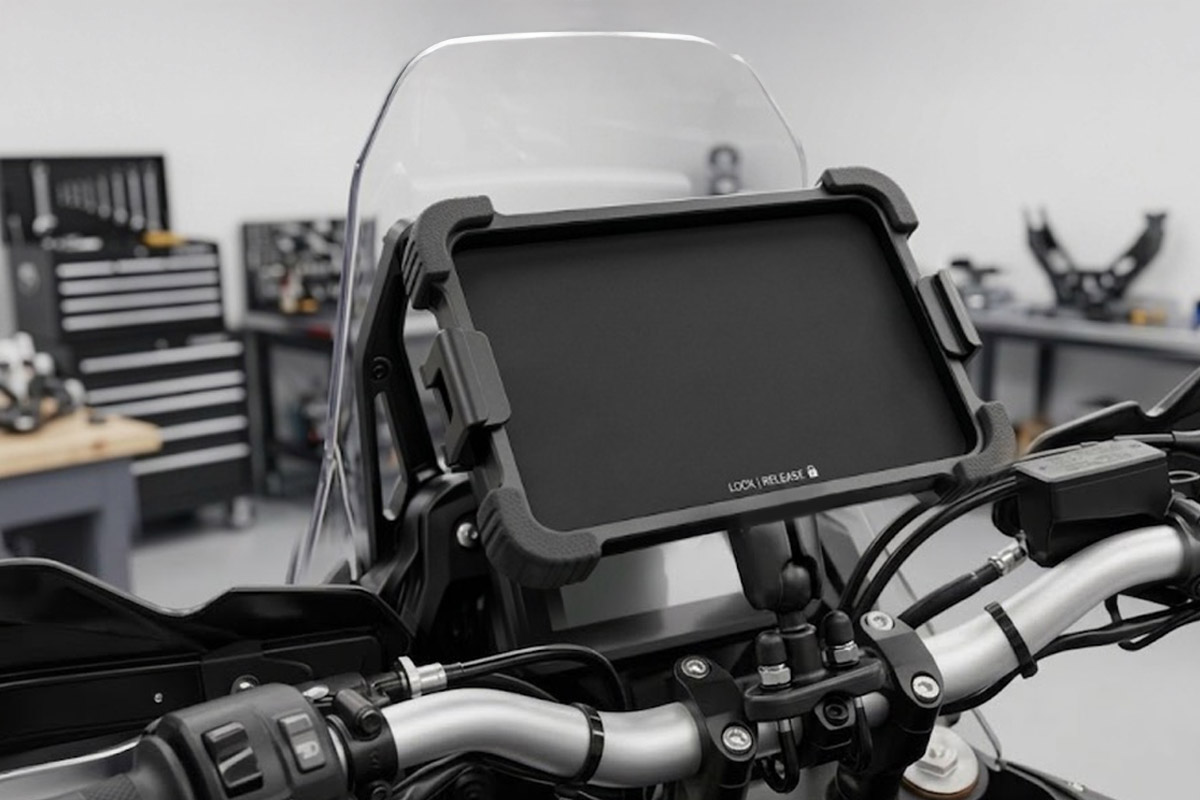
You have finally invested in a superb hardened tablet for your trail or enduro outings? Congratulations, you will rediscover navigation in XXL format! But there is still a major problem to be solved, and not least: how to attach this beautiful screen to your motorcycle without seeing it fly away at first braking?
On off-road, the choice of support is almost as important as the choice of GPS itself. Forget everything you know about road phone carriers: Here, vibrations, weight and shocks impose new rules to withstand the weight and size of hardened tablets.
Why Your Smartphone Stand Won't Be Enough (Quad Lock-Type Stands Trap)
This is the number one error of beginners: try to adapt a classic smartphone holder (such as a Quad Lock, SP Connect or an Amazon plastic stand) to hang a tablet. This is the insured crash.
The explanation is purely mechanical. A large smartphone weighs about 220 grams. A hardened tablet like the Samsung Tab Active 3 weighs more than 420 grams, and some models are close to the kilo! With the tremors of the runway, the corrugated sheet and the shocks, this weight multiplies the leverage effect. The plastic locking fins on your smartphone stand will simply shear clean and your tablet will fly away. For a tablet, it is therefore mandatory to pass on the adapted and more resistant mechanical fastener.
Fixing: What is the AMPS standard?
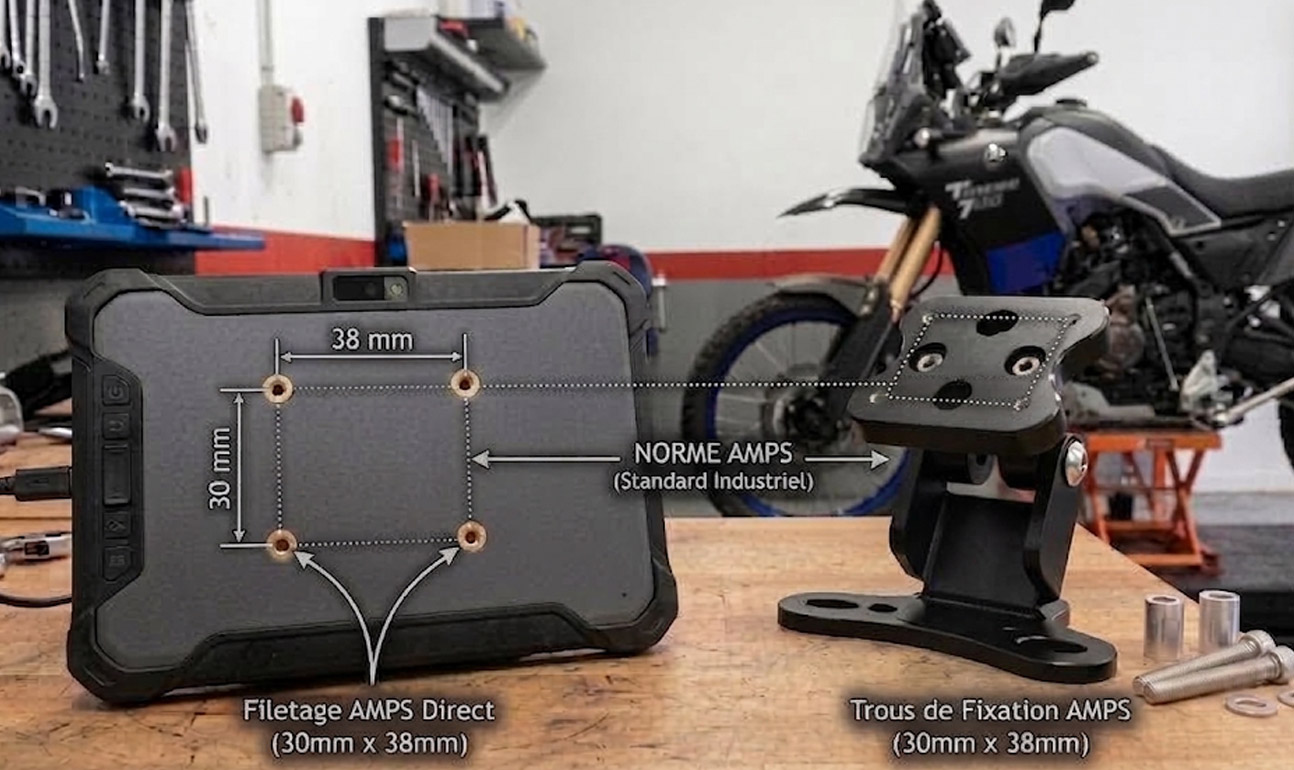
If you are looking for tablet stands or rally equipment, you will hear about the AMPS Standard (Automotive Mobile Phone Standard). Behind this name is a very simple industrial standard: it is a rectangular plastic or metal fastening plate format with 4 holes precisely spaced 30 mm x 38 mm It was designed to standardise the attachment of mobile tablets in cars. This industrial standard makes it possible to secure electronic equipment (tablets, GPS, smartphones) with great stability, even in professional, military or off-road environments (emergency vehicles, trucks, motorcycles).
This is the only reliable method to collect without breaking the weight of an off-road tablet. Most high-end tablets (Hugerock, Carpe Iter) have these 4 holes directly threaded into their rear frame. For the others (Samsung, Oukitel), it is necessary to use an intermediate cradle pierced to the same standard.
Top 5 Solutions to Fix Your Motorcycle Tablet
1. The AMPS articulated arm kit: the Mandatory Standard
This is the basic kit par excellence. If your tablet (or cradle) has the famous 4 holes on the back, you need this RAM Mount kit (or SW-Motech equivalent). It consists of a ‘U’ stirrup that attaches to your handlebar (secured by 2 nuts, so it is impossible to lose the support while rolling), an articulated clamping arm, and a plate larger than the AMPS format that you screw on the back of the screen of your navigation tablet.
The advantage: the kneecaps (soft plastic rubber type) absorb some of the microvibrations generated by your motorcycle’s engine, and the articulated arm makes it possible to find the perfect angle to avoid the reflections of the sun, whether you are sitting or standing on the footrests.
2. ‘Coquilles’ cradles: the Pro Solution for Samsung Tab Active
The Samsung Galaxy Tab Active is an excellent hardened tablet for the , bike but it has a totally smooth back! To fix it, we use a custom-made rigid cradle in which the tablet comes to slide and clip firmly (with or without key locking).
RAM Mounts offers two schools: the Passive Support (Tab-Tite), which holds the tablet firmly but forces you to plug in your cable yourself, and the Active Support (RAM-HOL-SAM60CP), which directly integrates the charging pins (Pogo pins). As soon as you slide the tablet in, it charges, without any USB cable exposed to rain! Reminder: These shells are sold naked. It is necessary to screw the AMPS Kit (see point 1) on the back to hang them on the handlebars.
3. Large-format X-Grip RAM: The all-in-one universal
Do you use several different devices or do you not want to bother with a complex mounting based on screwed plates? The RAM X-Grip for tablet is a big powerful clamp mounted on spring.
The model with fixation Tough-Claw is a complete kit: the lower jaw shakes by hand on any tube (hand handlebar, crash bar) and the upper cross clamp grabs the tablet. It is perfect for driving and walking. Attention: for off-road exits on brittle paths, it is imperative to put the rubber safety elastic provided, otherwise the tablet will slide from the clamp on a big jump or on a shock in the paths.
4. Dedicated media (e.g.: Oukitel RT3): Perfect integration
For tablets that are very popular with bikers but lack AMPS holes, such as the excellent Oukitel RT3 or RT3 Pro, specialized French craftsmen such as Motoboxer develop custom aluminum cradles.
Designed specifically for the exact dimensions of the tablet, these laser cut supports offer a stiffness worthy of the Dakar motorcycles. The tablet is literally hung in a metal cage. This is the ultimate solution for those who make a severe crossing and do not want to feel any game in the fixation.
5. Lifting bars and forkheads Rally: Keep your head up!
Attaching your tablet to the handlebars is good, but it requires constantly lowering your eyes, which can be dangerous when trailing at good speed. The real trend is to move the screen above the original counters, just behind the bubble.
For this, there are two levels of equipment. The tubular fastening bars (Givi type), which create a small solid arch behind your original bubble to clamp your support. And for the purists, the Complete Rally forkheads (like those of Motoboxer), which replace the entire front of the bike with a real aluminium and Plexiglas navigation tower, turning your classic trail into a real rally-raid machine!
Bonus: How to power your tablet without draining the battery of your motorcycle?
Now that your tablet is securely fastened, it needs to be fed. A tablet with full brightness and GPS enabled consumes a lot. Beginner's error? Connect a cable directly to the battery poles. The day you forget to unplug the tablet at lunch break, you don't leave!
It is imperative to have an intelligent system or “after contact”. Here are the two simplest solutions to install yourself:
1. The ‘Zero DIY’ solution: the OptiMate USB O-108 Cable
If your bike is already equipped with the small SAE charging cable (the one that is allowed to be passed under the saddle to connect the charging maintainer in winter), this is the ideal solution. This cable connects directly to it. Better yet: it has built-in protection. If your bike's battery voltage becomes too low (under 12.4 V), it switches off the USB power supply to ensure you can start.
2. The smart solution: the Quad Lock Smart Adapter
Even if we have seen that the Quad Lock mechanical supports are not adapted to the weight of the tablets, their electric adapter is top! You plug the pods directly into the + and - of your battery, without looking for an after-contact fuse. The adaptor detects engine vibration or alternator voltage build-up. As soon as the engine shuts off, the power supply shuts off. It is magical and dreadfully effective.
You are ready to ride for days without losing track or running out of battery. Which system did you choose for your motorcycle? Feel free to ask your questions in the comments!
Now that you know how to fix it, all you have to do is find the ideal screen. Discover our selection of the best models tested for enduro and trail running.
Transparency: this Article contains affiliate links. If you decide to buy equipment via these links, we receive a small commission that helps to make the site live and produce independent comparisons, without this changing the final price for you. Thank you for your support!






Comments
Leave a comment